✓
LinkedIn job extraction
A local-first Chrome extension that helps you capture job details, organize applications, fill repetitive application fields, analyze job fit, and prepare grounded resume changes while keeping you in control of every final decision.
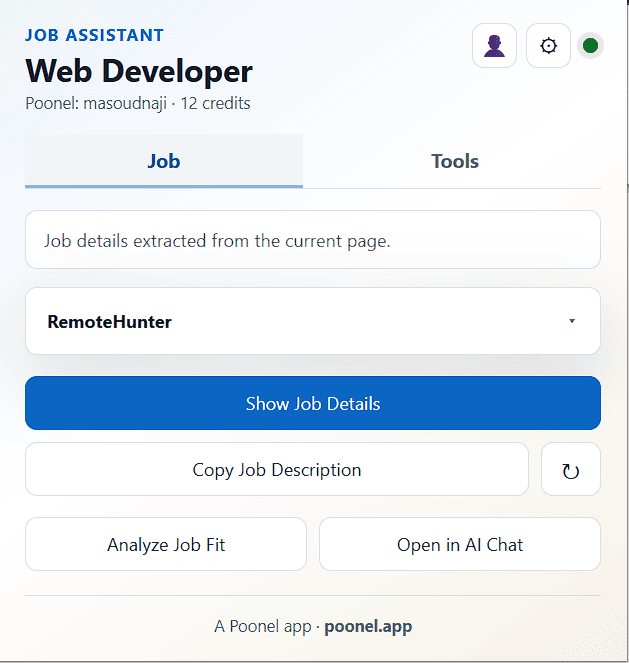
LinkedIn job extraction
Search result collection
Bulk job import
Multiple applicant profiles
Original DOCX resume storage
AI-generated Resume Data
Smart field mapping
Application form assistance
Resume vs. job analysis
Grounded resume suggestions
Before / after resume preview
Updated Word resume generation
Application history
Application status tracking
AI provider selection
Local-first browser storage
User-controlled submission
Job Application Assistant is designed as an assisted workflow, not an autonomous job-application bot. Set up your profile once, choose how you want to use AI, then reuse that context as you discover, analyze, prepare, and track applications.
Create one or more applicant profiles with the information you repeatedly enter on job applications, including your name, email, phone, location, current title, LinkedIn profile, portfolio, and GitHub URL. Choose one profile as your active profile whenever you apply.
Multiple profiles are supported. The active profile controls which applicant information is used, and profile information is stored locally in the browser.
Add your original Word resume (.docx) to a profile. The original document is stored locally and remains unchanged. The extension can generate structured Resume Data from the document so AI-assisted features can reason about your actual experience without rewriting the source resume.
Your original DOCX is the source document. Suggested resume changes never overwrite it.
AI features are optional and provider-controlled. Choose the provider that fits your workflow in Settings.
Your selected provider is used by supported AI features such as Resume Data generation, job-fit analysis, and resume suggestions.
When you use an AI feature, the context required for that request is sent according to the provider you selected. Gemini and OpenAI can use your own API key. Poonel AI sends the required resume/job context through Poonel's server and uses your Poonel credits.
Open a supported LinkedIn job page and let the extension capture structured job information. You can review the captured details before using them for analysis or application preparation.
For larger searches, Search Result Collection and Bulk Import help collect multiple roles, deduplicate job IDs, and organize them without manually rebuilding the same context for every listing.
Analyze the job against the active profile and Resume Data. The assistant can identify strong matches, missing requirements, underemphasized experience, and areas worth reviewing before you apply.
The job description is used as relevance criteria, not as evidence about your experience.
Instead of silently rewriting your resume, the assistant presents suggested changes for review. Compare the original and suggested content, edit a suggestion, accept it, or keep the original.
Accepted changes can be previewed before generating an updated Word document. The original DOCX remains unchanged.
Select your active profile and use Fill Application Fields to reduce repetitive typing on application forms. Smart Field Mapping helps the extension recognize and reuse mappings for common and custom fields.
The extension fills recognized fields for review. It does not automatically submit the application.
Keep a local record of the jobs you are working with and update their application status as your search progresses. Application History gives you a reviewable record instead of leaving job context scattered across tabs and websites.
Use Smart Field Mapping to manage how application form fields connect to your applicant profile. The extension can reuse saved mappings on supported application pages, helping reduce repetitive manual entry.
Review, edit, disable, or remove saved mappings whenever needed.
Use Bulk Import to collect and organize multiple job listings without manually capturing each one individually. Review imported jobs, remove duplicates, and keep useful job information available for later analysis and application tracking.
Right-click on a supported page and open the Job Assistant menu to quickly access common actions.
From the right-click menu, you can analyze the current LinkedIn job, open job information in your configured AI chat, copy structured job data, or capture text from the current page.
The available actions include:
These shortcuts use the current page context, helping you work with the job or page you are currently viewing.
You make the final decision. The extension helps with repetitive work, organization, analysis, and preparation, not autonomous submission.
Profiles, application history, captured job data, field mappings, settings, and your original resume are stored locally in browser storage. Core organization and form-assistance features do not require Poonel AI.
AI features are optional. When you choose to use one, the context needed for that request is sent according to your selected AI provider. Poonel AI uses your Poonel account and credits, while supported BYOK providers use the API credentials you configure.

No for the core local workflow. A Poonel account is required when you choose Poonel AI. Other supported AI options can use your own provider credentials.
No. AI-assisted analysis and resume features are optional. Core profile, organization, field-mapping, and application-tracking workflows can be used without AI.
Core extension data such as profiles, captured job context, mappings, and application history is stored locally in the browser.
The original DOCX is stored locally by the extension. When you explicitly use an AI feature, the context needed for that request may be sent to the AI provider you selected.
No. The extension is intentionally user-controlled. It can prepare information and fill recognized fields, but you review the application and control final submission.
The resume workflow is designed to ground suggestions in your existing Resume Data. Job-description requirements are relevance criteria, not evidence that you have a skill or experience.
No. The original DOCX remains unchanged. Accepted changes are applied to a separate updated copy.
The current AI settings support Gemini, OpenAI, and Poonel AI. Gemini and OpenAI can use your own API key; Poonel AI uses your Poonel account and credits.